
Hello,
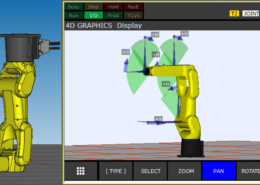
Is it possible to change to orientation of an inverted mounting robot.
I need to see the robot using 4D graphics in the TeachPendant exactly as it phisically mountend.
It’s really helpful to easilly jog the robot.
Thank you for your help
Please briefly explain why you feel this question should be reported.
Please briefly explain why you feel this answer should be reported.
Please briefly explain why you feel this user should be reported.
Hello,
Is it possible to change to orientation of an inverted mounting robot.
I need to see the robot using 4D graphics in the TeachPendant exactly as it phisically mountend.
It’s really helpful to easilly jog the robot.
Thank you for your help
Hi,
Go to SYSTEM => SYSTEM Variables => CELL_GRP => CELL_GRP_T :
you can change the values of XYZ WPR to adjust the mounting in the 4D graphics. It only adjust the view.
but please, if you have a inverted mounted robot, You must controlled start => maintenace
“mount angle setting” you have to choose 180 (Upside down)
Have a nice day
Hello
thank you your answer helped me a lot. I have a flipped robot in 4D view for an inverted/upside down FANUC M200i/D.
I confirm that the values of XYZ WPR in SYSTEM Variables => CELL_GRP => CELL_GRP_T
Only change the position of robot in teach pendant and there is no impact about the existing teach points.
good luck